🛠️ Create a Selector for Scraping
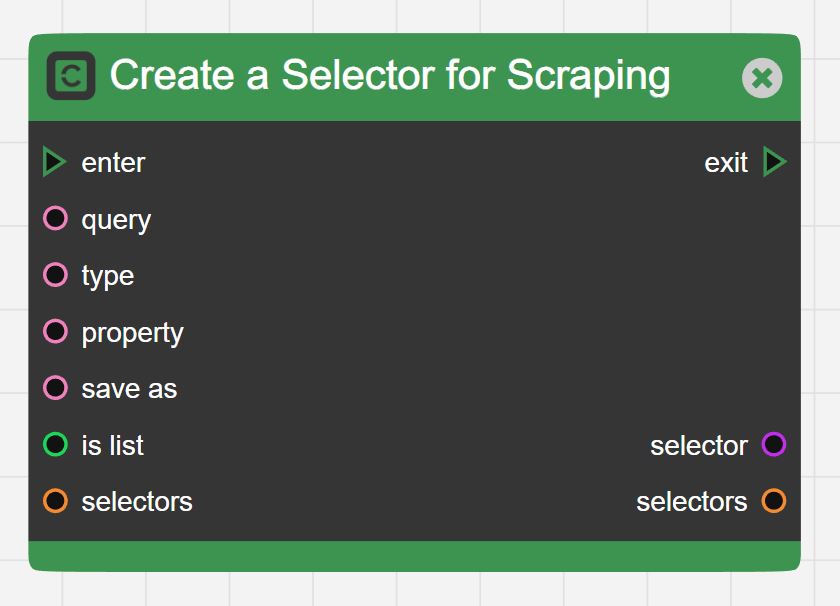
-
Data Inputs
- query
- Pass a Css selector defining which part of the HTML to extract
- Useful Links to learn about CSS Selectors
- Basic Tutorial on Selectors: https://pushpinder.hashnode.dev/css-selectors-101
- Advanced Tutorial on Selectors: https://code.tutsplus.com/tutorials/the-30-css-selectors-you-must-memorize--net-16048
- Translate Selectors in English to understand what they mean: https://kittygiraudel.github.io/selectors-explained/?s=.titleline%2520a%253Afirst-chil
-
type
The 5 dropdown values in Create a Selector:
- Text: Used to get text value of any element and it's children.
- Attribute: If you choose attribute you need to provide property value. Used to get value of an attribute inside an element like https://asdas.com">, has attribute with a property href.
- Data: If you choose attribute you need to provide property value. Used to get value of a data attribute inside an element like , has a data attribute with property name.
- Html: Returns the full HTML, needed only for rare cases.
- Value: Returns the value inside a form input. Very rare.
First 3 are most often used and the key skill is coming up with the right selectors.
-
property
- In case of Attribute and Data type, you need to define the property, which tells the block which property to extract.
- For example:
- An element like https://asdas.com">, has type as “attribute” with a property as “href”.
- An element like , has type as “data” with the property as “name”.
- save as
- Give a name that you want to save the values extracted using this selector.
- The scraped data will be saved under this name.
- is list
- Boolean value determines if the data you are selecting occurs once on the page or more than once.
- Set this to true, if there are multiple values of the data you are trying to extract.
- Example: Names of all articles on a news listing or Price of all hotels on booking.com page.
- Set this to false, if there is only 1 value of the data on the page.
- Example: Title of the page or heading of an article
- selectors
- This is used to chain selectors one after the other
- More often than not, you would want to get multiple data values from the same page, so you can create multiple instances of Create a Selector for Scraping block.
- Then connect the output selectors to input selectors of these blocks to create a list of selectors.
- Then when all the selectors have been created you can pass the final block’s selectors value to the Scrape a Page block
- query
-
Data Outputs
- selector
- Contains an object representing the selector created
- selectors
- Contains the list of all selectors chained till now
- The current selector created is added to the selectors list
- If selectors input was empty, the selectors output will contain 1 selector object for this block.
- selector